
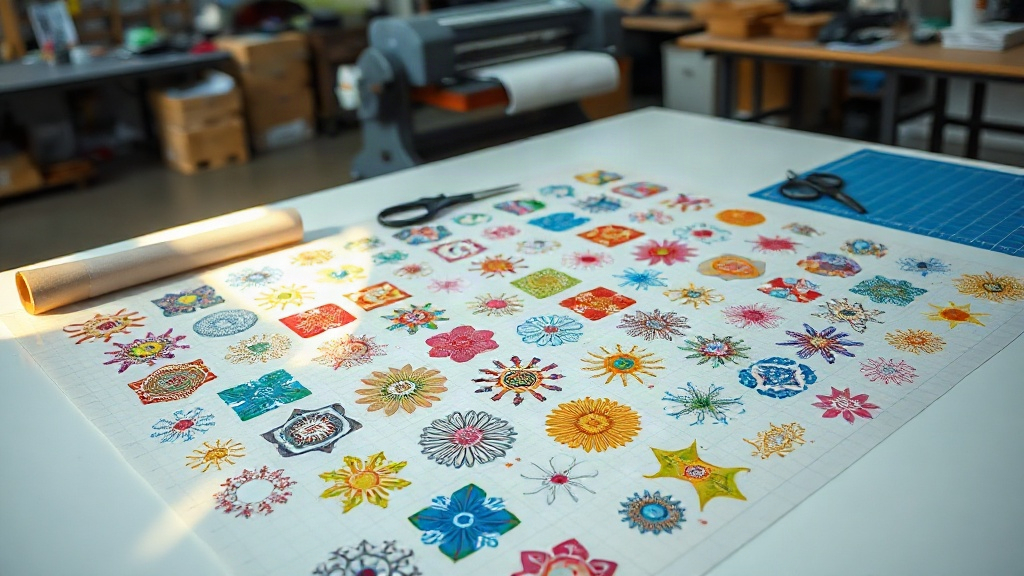
If you're in the custom apparel business, you've likely heard about DTF printing. It's a game-changer for transferring vibrant designs onto various fabrics. But did you know there's a way to make your DTF printing even more efficient? Enter the DTF gangsheet. This powerful technique allows you to print multiple designs in one go, saving you time, money, and effort. In this guide, we'll dive deep into what a DTF gangsheet is, why it matters, and how you can leverage it to grow your business. Whether you're a seasoned pro or just starting out, mastering gangsheets will take your production to the next level.
What is a DTF Gangsheet?
A DTF gangsheet is essentially a large sheet of transfer film that contains multiple designs arranged together. Instead of printing each design individually, you combine several designs onto a single sheet, hence the term 'gangsheet'. This method is widely used in the DTF printing community to maximize efficiency. By grouping designs, you can utilize the entire width of your printer and reduce wasted film. But it's not just about saving materials; it's also about saving time. When you print a gangsheet, you produce multiple transfers in one print job, cutting down on setup and production time significantly.
The concept is similar to gang printing in offset printing, where multiple jobs are combined on one sheet. In DTF, the gangsheet approach is particularly beneficial for small to medium-sized orders that would otherwise require separate print runs. For example, if you have a batch of t-shirts with different designs, you can place all those designs on one gangsheet, print it, and then cut them apart for pressing. This not only speeds up the process but also ensures consistent quality across all transfers.
How Does DTF Printing Work?
Before we delve deeper into gangsheets, let's briefly recap how DTF printing works. DTF stands for Direct to Film. The process involves printing your design onto a special PET film using a DTF printer with pigment-based inks. After printing, a layer of adhesive powder is applied to the wet ink, and then the film is cured. The resulting transfer can be pressed onto various fabrics, including cotton, polyester, and blends. The magic of DTF is its versatility and durability; the prints are stretchable, vibrant, and long-lasting.
Now, when you create a DTF gangsheet, you're essentially preparing a file that contains multiple designs laid out on a single canvas that matches the width of your printer. This file is then printed as one job. The key is to arrange the designs efficiently to minimize gaps and maximize the use of the film. Once printed and powdered, you can cut out each design individually and store them for later use. This approach is especially handy for print shops that handle a variety of orders daily.
Why Use a DTF Gangsheet?
The benefits of using a DTF gangsheet are numerous. Let's explore the main advantages:
- Time Efficiency: Printing multiple designs in one go reduces the time spent on loading and unloading film, setting up print jobs, and monitoring the printer. You can produce a large batch of transfers in a fraction of the time it would take to print them individually.
- Cost Savings: By maximizing the use of the film, you reduce waste. DTF film and ink are not cheap, so optimizing your layout can lead to significant savings. Additionally, less setup time means lower labor costs.
- Consistency: When you print designs together on the same sheet, they undergo the same printing conditions, resulting in consistent color and quality. This is crucial for orders that require multiple identical or coordinated designs.
- Scalability: Gangsheets make it easy to scale up production. Whether you need 10 transfers or 100, you can arrange them on a gangsheet and print them all at once. This is perfect for growing businesses.
- Storage and Organization: Once printed, gangsheets can be cut into individual transfers and stored. You can build an inventory of popular designs, ready to press when an order comes in. This speeds up fulfillment and improves customer satisfaction.
Moreover, gangsheets are not just for large orders. Even if you have a variety of small orders, combining them into one gangsheet can streamline your workflow. For instance, if you run a custom t-shirt shop, you might have orders for different customers with different designs. Instead of printing each design separately, you can group them all on one gangsheet, print, and then cut them apart. This reduces the number of print jobs and simplifies tracking.
When to Use a DTF Gangsheet
Gangsheets are ideal in several scenarios:
- Batch Production: When you have multiple designs that need to be printed for an upcoming event or promotion.
- Inventory Building: If you want to stock up on popular designs to offer quick turnaround to customers.
- Mixed Orders: When you have several small orders that can be combined to fill a sheet.
- Testing Designs: If you want to test multiple designs at once to see how they look after pressing.
However, gangsheets may not be suitable if you have a single large design that takes up the entire sheet. In that case, printing it individually might be more straightforward. But for most other situations, gangsheets are a smart choice.
How to Create a DTF Gangsheet
Creating a gangsheet requires some planning and the right tools. Here's a step-by-step guide:
- Choose Your Designs: Select the designs you want to include. Ensure they are high resolution and properly sized. Remember that DTF printing can handle intricate details, so don't shy away from complex artwork.
- Determine Your Sheet Size: The sheet size should match the width of your DTF printer's film. Common widths are 13 inches, 17 inches, and 24 inches. The length can be as long as your printer allows, but typically up to several feet.
- Use Gangsheet Software: There are specialized software and online tools for creating gangsheets. These tools allow you to import your designs, arrange them on a canvas, and optimize the layout. Some popular options include Gangsheet Builder, DTF Gangsheet Maker, and even Adobe Photoshop with custom templates. If you're handy with design software, you can create your own template.
- Arrange Designs Efficiently: Place your designs on the canvas, leaving minimal gaps between them. Rotate designs if necessary to fit better. The goal is to use as much of the film as possible without overlapping designs. Leave a small margin around each design for cutting.
- Add Cut Lines (Optional): Some software allows you to add cut lines or registration marks to make cutting easier later. This is especially useful if you have many designs.
- Save and Export: Save your gangsheet as a high-quality PDF or PNG file. Ensure the resolution is at least 300 DPI for crisp prints.
- Print and Process: Load the file into your DTF printer and print it onto the film. Follow your printer's instructions for ink settings. After printing, apply adhesive powder, cure, and then cut the designs apart.
It might take a few tries to get the hang of optimizing your gangsheet layout, but once you do, you'll wonder how you ever managed without it.
Tips for Efficient Gangsheet Layout
To get the most out of your gangsheets, consider these tips:
- Group by Color: If you have designs with similar color palettes, group them together to minimize ink changes and improve color consistency.
- Use Nesting: Nesting is a technique where you fit smaller designs into the empty spaces around larger ones. Many gangsheet tools have automatic nesting features.
- Leave Space for Cutting: Don't place designs too close to the edges; leave at least 0.25 inches for cutting and handling.
- Consider the Grain: If your designs have a direction (like text), ensure they are oriented correctly. Remember that you'll be pressing the transfer onto fabric, so the design should be mirrored if necessary. Most DTF printers print mirrored by default, so your gangsheet should be set up accordingly.
- Test Print: Before committing to a full gangsheet, do a small test print to check colors and alignment.
By following these tips, you'll create gangsheets that are both efficient and high-quality.
Common Mistakes to Avoid with DTF Gangsheets
Even experienced printers can make mistakes. Here are some pitfalls to watch out for:
- Overcrowding: Trying to fit too many designs on one sheet can lead to overlapping or insufficient space for cutting. It's better to use two sheets than to ruin one.
- Incorrect Mirroring: Forgetting to mirror your designs will result in backwards prints. Always double-check before printing.
- Ignoring Resolution: Using low-resolution images will produce pixelated transfers. Always use high-res artwork.
- Inconsistent Powder Application: If you're manually applying adhesive powder, ensure even coverage. Uneven powder can cause poor adhesion or a rough texture.
- Skipping Curing: Proper curing is essential for durable transfers. Follow your powder and film manufacturer's recommendations for temperature and time.
Avoiding these mistakes will save you time and materials, and ensure your customers are happy with the results.
Frequently Asked Questions about DTF Gangsheets
What is the maximum length of a DTF gangsheet?
The maximum length depends on your printer's capabilities. Most DTF printers can handle rolls of film that are 100 meters or more, but for gangsheets, you typically print a segment that can be as long as you need, limited by the software and printer's memory. In practice, gangsheets are often several feet long, but you can make them shorter to manage handling. It's best to check your printer's specifications.
Can I use a DTF gangsheet for different fabric types?
Yes, DTF transfers work on a wide range of fabrics, including cotton, polyester, nylon, and blends. However, the pressing temperature and time may vary slightly depending on the fabric. Always test on a scrap piece first. The beauty of DTF is its versatility, so a single gangsheet can contain designs for various garments.
How do I cut a DTF gangsheet?
You can cut the gangsheet using scissors, a craft knife, or a cutting machine like a Cricut or Silhouette. For precise cuts, use the cut lines you added in the design phase. If you don't have cut lines, simply cut around each design, leaving a small border. Some people prefer to cut after pressing, but cutting before pressing allows you to store individual transfers.
Is a DTF gangsheet cost-effective for small orders?
Absolutely. Even for small orders, combining multiple designs on one gangsheet reduces film waste and print time. If you have several small orders, grouping them can be very cost-effective. However, if you only have one small design, it might be more practical to print it alone, but you can always add it to a gangsheet with other designs to fill the space.
What software do you recommend for creating DTF gangsheets?
There are several options. For beginners, online tools like Gangsheet Builder are user-friendly and often free. For more control, Adobe Photoshop or Illustrator can be used with custom templates. Some RIP software for DTF printers also includes gangsheet layout features. Choose based on your budget and design skills.
Mastering the DTF gangsheet is a skill that will pay off in your printing business. It's a method that combines efficiency, cost savings, and quality. Whether you're a small startup or a large operation, incorporating gangsheets into your workflow can significantly enhance your productivity. So next time you fire up your DTF printer, consider creating a gangsheet and experience the difference.