
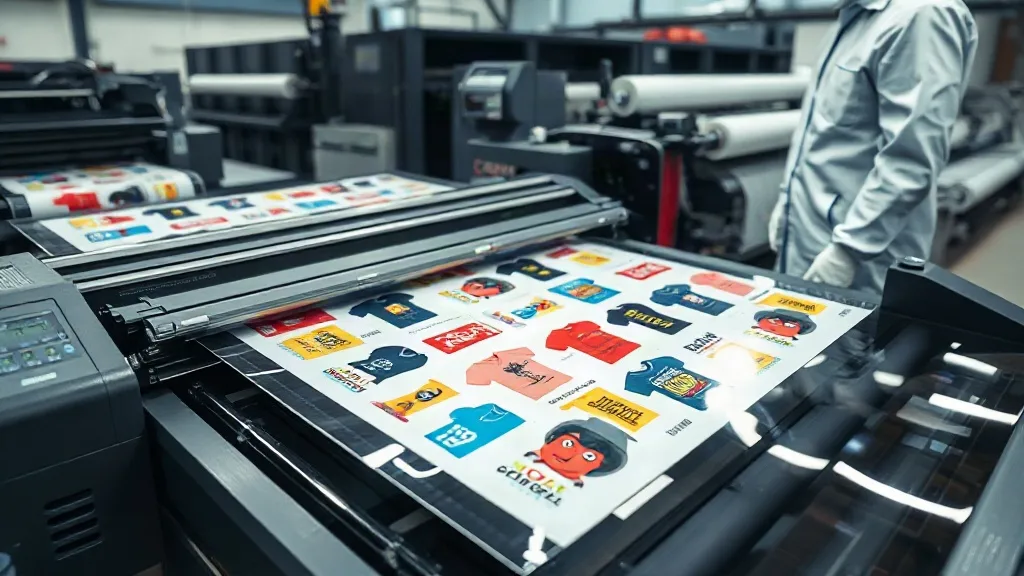
If you run a custom apparel business, you know that time and cost efficiency can make or break your margins. Every minute spent on setup and every inch of wasted material eats into your profits. That's where DTF Gangsheet comes in. This innovative printing method lets you arrange multiple designs on a single sheet, maximizing efficiency and minimizing waste. In this guide, we'll explore what DTF gangsheets are, how they work, and why they're a game-changer for your production workflow.
What is a DTF Gangsheet?
A DTF (Direct to Film) gangsheet is a large sheet of transfer film that contains multiple printed designs arranged together. Instead of printing each design individually, you consolidate many jobs onto one sheet, which is then pressed onto garments as needed. This approach is similar to gang printing in offset lithography, where multiple items are printed on a single sheet to save time and materials. With DTF gangsheets, you can print a variety of sizes, colors, and quantities all at once, making it ideal for small to medium-sized orders, sample runs, and mixed batches.
How DTF Gangsheets Work
The process begins with preparing your artwork. You'll need to arrange your designs on a template that matches the width of your DTF printer's film. Most DTF printers accommodate film widths from 13 inches to 24 inches or more. Once your designs are laid out with proper spacing, the printer deposits a layer of white ink (for opacity) followed by CMYK color inks onto the film. A powdered hot-melt adhesive is then applied to the wet ink, and the film is cured. The result is a ready-to-press transfer sheet that can be stored and used on demand.
Key Components of a DTF Gangsheet
- Film: A special PET film coated to receive the ink and release the transfer cleanly.
- Inks: Pigment-based CMYK and white inks formulated for DTF printing.
- Adhesive Powder: A thermoplastic powder that melts and bonds the design to the fabric.
- Design Layout: The arrangement of multiple designs on the film, optimized for space and cutting.
Benefits of Using DTF Gangsheets
Switching to DTF gangsheets can transform your production process. Here are some compelling reasons to adopt this method:
1. Cost Savings
By consolidating multiple designs onto one sheet, you significantly reduce waste and make the most of your materials. You'll use less film, ink, and powder per design, lowering your cost per print. Additionally, you can take advantage of volume discounts from transfer suppliers, further improving your bottom line.
2. Time Efficiency
Printing a single gangsheet takes about the same time as printing one design, but you get dozens of transfers ready to go. This means you can fulfill orders faster, especially when you have repeat customers or popular designs. You can also prepare gangsheets in advance and store them, so you're always ready for last-minute orders.
3. Versatility
DTF gangsheets work on a wide range of fabrics, including cotton, polyester, blends, and even nylon. They're perfect for t-shirts, hoodies, tote bags, and more. You can mix different designs, sizes, and colors on one sheet without worrying about color bleeding or compatibility issues.
4. High-Quality Results
DTF transfers produce vibrant, detailed prints with excellent wash durability. The white ink base ensures that colors pop on both light and dark garments, and the prints remain soft and flexible. Unlike screen printing, there's no color mixing or screen setup, so you can achieve photorealistic designs with ease.
How to Create a DTF Gangsheet
Creating a gangsheet requires careful planning. Follow these steps to ensure a smooth workflow:
Step 1: Prepare Your Artwork
Collect all the designs you want to include. Ensure they are high-resolution (300 DPI) and in CMYK color mode. If you're working with vector files, convert them to raster images at the correct size. Pay attention to the dimensions: each design should fit within the printable area of your film.
Step 2: Arrange Designs on a Template
Use design software like Adobe Illustrator, Photoshop, or a dedicated gangsheet builder tool. Create a canvas that matches your film width (e.g., 13 inches). Place your designs with at least 0.25 inches of space between them to allow for cutting. Group similar colors together to optimize ink usage, but keep in mind that DTF printers print all colors in one pass, so color grouping is less critical than in screen printing.
Step 3: Add Registration Marks
Include registration marks or crop marks to help you align and cut the transfers accurately after printing. Some gangsheet builders automatically add these marks.
Step 4: Print and Cure
Load the film into your DTF printer and print the gangsheet. Follow the printer manufacturer's settings for ink density and white ink layering. After printing, apply adhesive powder evenly, shake off excess, and cure the sheet in a heat press or oven according to the powder's instructions.
Step 5: Store and Use
Store the gangsheet in a cool, dry place away from direct sunlight. When ready to use, cut out the individual designs and press them onto garments with a heat press. The transfers can be stored for several months without significant degradation.
Tips for Maximizing Efficiency with DTF Gangsheets
- Nest designs tightly: Use nesting techniques to fit more designs on a sheet, but leave enough space for cutting.
- Group by order: If you have multiple orders, group designs by customer or order to streamline fulfillment.
- Use a gangsheet builder: Software tools can automatically arrange designs and calculate material usage, saving time and reducing errors.
- Keep a library of ready-to-print gangsheets: For popular designs, pre-print gangsheets and store them for quick turnaround.
- Regularly maintain your printer: Consistent maintenance ensures optimal print quality and reduces waste.
Common Mistakes to Avoid
Even experienced printers can make mistakes with gangsheets. Watch out for these pitfalls:
- Overcrowding: Placing designs too close together can cause ink bleeding or make cutting difficult.
- Inconsistent white ink: Ensure the white layer is thick enough to prevent color dulling on dark fabrics.
- Improper curing: Under-curing leads to wash-off; over-curing can make the transfer brittle. Follow powder specs.
- Ignoring film orientation: Always print on the coated side of the film; otherwise, the ink won't adhere properly.
Frequently Asked Questions
What is the maximum width of a DTF gangsheet?
The maximum width depends on your printer. Common DTF printer widths are 13 inches, 17 inches, and 24 inches. Some industrial models can handle wider film, up to 60 inches or more. Always check your printer's specifications.
Can I use DTF gangsheets on dark-colored shirts?
Absolutely. DTF transfers include a white ink base that provides opacity, allowing vibrant colors to show up on dark fabrics. Just ensure the white layer is properly applied and cured.
How long can I store a DTF gangsheet before using it?
When stored in a cool, dry place away from direct sunlight, DTF transfers can last for 6 to 12 months. Always follow the storage recommendations from your transfer supplier.
Do I need special software to create a gangsheet?
You can use standard graphic design software like Adobe Illustrator or Photoshop, but dedicated gangsheet builder tools can automate the layout and save time. Some transfer suppliers also offer free templates.
What fabrics are not suitable for DTF transfers?
DTF works on most fabrics, but it may not adhere well to fabrics with heavy silicone coatings or certain waterproof treatments. Always test on a small area first.
Conclusion
DTF gangsheets are a smart investment for any custom apparel business looking to boost efficiency and reduce costs. By mastering the art of gangsheet creation, you can streamline your production, offer faster turnaround times, and delight your customers with high-quality prints. Start experimenting with gangsheets today and watch your productivity soar.